
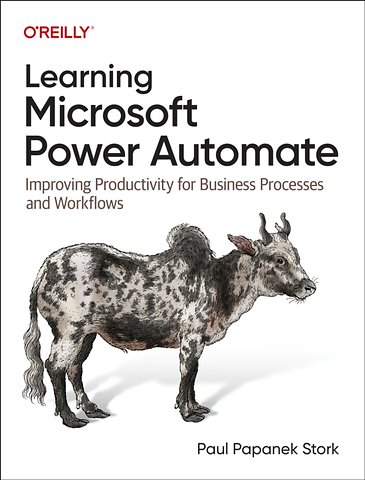
Learning Microsoft Power Automate
Improving Productivity for Business Processes and Workflows
Paperback Engels 2023 1e druk 9781098136369Samenvatting
Processing information efficiently is critical to the successful operation of modern organizations. One particularly helpful tool is Microsoft Power Automate, a low-code/no-code development platform designed to help tech-savvy users create and implement workflows.
This practical book explains how small-business and enterprise users can replace manual work that takes days with an automated process you can set up in a few hours using Power Automate.
Paul Papanek Stork, principal architect at Don't Pa..Panic Consulting, provides a concise yet comprehensive overview of the foundational skills required to understand and work with Power Automate. You'll learn how to use these workflows, or flows, to automate repetitive tasks or complete business processes without manual intervention.
Whether you're transferring form responses to a list, managing document approvals, sending automatic reminders for overdue tasks, or archiving emails and attachments, these skills will help you:
- Design and build flows with templates or from scratch
- Select triggers and actions to automate a process
- Add actions to a flow to retrieve and process information
- Use functions to transform information
- Control the logic of a process using conditional actions, loops, or parallel branches
- Implement error checking to avoid potential problems
Specificaties
Lezersrecensies
Inhoudsopgave
Who Should Read This Book
Why I Wrote This Book
Navigating This Book
Conventions Used in This Book
O’Reilly Online Learning
How to Contact Us
Acknowledgments
1. What Is Microsoft Power Automate?
Why Use Power Automate?
Who Are Citizen Developers?
Migrating from SharePoint Designer to Power Automate
Why Not Use SPD Workflows?
Power Automate Limitations and Workarounds
How This Book Will Teach Power Automate
Summary
2. Getting Started: What You Need to Know
Key Licensing Terms
Licensing Options
Power Automate Free
Microsoft 365 Licensing
Dynamics 365 Licensing
Power Apps Licensing
Power Automate Standalone Plans
Pay-as-You-Go Licensing
Special Case Licenses
Power Virtual Agents License
Power Automate Trial License
Power Apps Developer Plan
Windows Licensing
Anatomy of a Flow
Triggers
Actions
Connectors
Types of Flows
Automated Cloud Flows
Instant Cloud Flows
Scheduled Cloud Flows
Desktop Flows
Business Process Flows
Accessing Power Automate
Power Automate Trial
Power Apps Developer Plan
Summary
3. Building Your First Flow
How to Use Templates
Using Flow Templates
Using Templates as a Learning Experience
Creating a New Cloud Flow
Starting with a Blank Flow
Creating a Flow from a Description
Design a Flow with Visio
Prerequisites
Design a Workflow in Visio
Summary
4. Working with Triggers and Actions
Triggers, Actions, and Connectors
Finding the Right Connector
Choosing a Trigger
Adding Actions
Adding Dynamic Content
Selecting Dynamic Content to Add
Where Is My Dynamic Content?
Using JSON
Understanding JSON Syntax
Looking Up JSON Syntax
Parsing JSON
Working with Expressions
Understanding Function Syntax
Adding Dynamic Content to an Expression
Format Data by Examples
Using the Action Ellipsis (…) Menu
Copying Actions
Renaming Actions and Triggers
Adding Comments
Adding Notes
Adding a New Connection
Changing Action Settings
Pagination
Secure Inputs and Secure Outputs
Asynchronous Pattern
Automatic Decompression
Timeout
Retry Policy
Tracked Properties
Trigger Settings
Split On
Custom Tracking ID
Controlling Concurrency
Implementing Trigger Conditions
Summary
5. Implementing Logic
The Control Connector
Controlling Actions with Conditions
Using Switches
Calling Child Flows
Processing Arrays with “Apply to each” Loops
Using “Do until” Loops
Adding Parallel Branches
Summary
6. Integrating with Other Power Platform Applications
Using Solutions
Creating a New Solution
Connection References
Environment Variables
Managed Versus Unmanaged Solutions
Power Apps
Invoking a Flow from a Power App
Passing Input Parameters
Returning Values
Power Virtual Agents
Invoking a Flow from a Chatbot
Returning a Formatted Table of Results
Power BI
Power Pages
Invoking a Flow from a Power Page
Summary
7. Troubleshooting Tips
Reviewing Run History
Filtering the All Runs View
Read the Error Message
Common Errors
Authentication Failures
Action Configuration Errors
Data Errors
Logic Errors
Monitoring and Tracking Cloud Flows
Email Notifications
Monitoring Cloud Flow Activity
View Analytics for Cloud Flows
Improving Performance with Process Mining
Fixing Flow Errors
Using the Flow Checker
Using Compose Actions to Check Values
Streamlining Testing
Adjusting Run After Settings
Using the Terminate Action
Using Scope Actions with Run After
Resubmitting Flows
Canceling Running Flows
Summary
8. Desktop Flows
What Is Robotic Process Automation (RPA)?
Prerequisites for Power Automate Desktop
Installing Power Automate Desktop
Machine Settings
Licensing Requirements
Creating a Desktop Flow
Exploring the Desktop Flow Design Surface
Learning from Desktop Flow Examples
Recording User Interactions
Adding and Editing Actions
Working with Variables
Handling Errors
Calling a Desktop Flow from a Cloud Flow
Attended Versus Unattended RPA
Passing Parameters to and from a Desktop Flow
Summary
9. Business Process Flows
What Is a Business Process Flow?
Creating a Business Process Flow
Prerequisites
Limitations
Adding Stages and Steps
Managing Security Roles
Validating and Activating a BPF
Example Introduction: Creating a BPF
Summary
Conclusion
Where Can I Learn More?
Power Automate Documentation
Microsoft Learning Website
Additional Resources
Additional Help
Finally
Index
About the Author
Anderen die dit boek kochten, kochten ook
-
 Barend Last€ 29,95
 -
Bas van Gils€ 54,45
-
Hendrik van Zwol€ 39,99
-
The Open Group€ 49,-
-
Eric Matthes€ 34,99
-
Jacinta Hall€ 97,01




Rubrieken
- advisering
- algemeen management
- coaching en trainen
- communicatie en media
- economie
- financieel management
- inkoop en logistiek
- internet en social media
- it-management / ict
- juridisch
- leiderschap
- marketing
- mens en maatschappij
- non-profit
- ondernemen
- organisatiekunde
- personal finance
- personeelsmanagement
- persoonlijke effectiviteit
- projectmanagement
- psychologie
- reclame en verkoop
- strategisch management
- verandermanagement
- werk en loopbaan