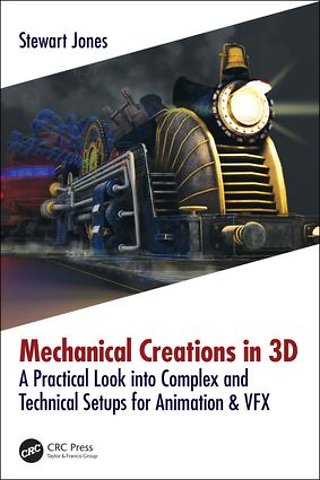
Mechanical Creations in 3D
A Practical Look into Complex and Technical Setups for Animation & VFX
Paperback Engels 2018 9781138560499Samenvatting
Cogs, cranks, wheels, plates, chains, springs and pistons - a nightmare for animators. This book shows 3D artists how to create, setup, control and automate movements for complex and technically challenging mechanical structures all while working on a super-detailed steampunk train! This book will specifically implement current industry trends and techniques for animated mechanical structures. We will be using Autodesk 3ds Max only, with no plugins and no additional software required. Readers will close out this book with a completed steampunk train for their portfolios and practical knowledge to combat other tricky hard-surface rigging and animation challenges.
Key FeaturesThis is the only book available for mechanical setups in Autodesk 3ds Max. Although 3ds Max specific, the techniques and foundations will work for any 3D application. By following the step-by-step guides in this book, you can finish and complete a portfolio-ready steampunk train. Each chapter will include an introduction and a summary, giving significance to the start and end of each section where readers can rest! Boxed step-by-step guides will be used for the creation of technical setups in 3ds Max. A "Memory Refresh" section is included in each chapter, this gives short and quick reminders for the stages needed to complete the chapter setup - helpful as a reference guide for those that have already read the book and just need a reminder, saving them time as they won’t have to re-read the whole thing!
Specificaties
Lezersrecensies
Inhoudsopgave
- Preface
- Acknowledgements
- About the Author
- Contributors
- CHAPTER 1: INTRODUCTION
- Chapter Overview
- Preparation
- Art and Science
- Principles
- Naming Conventions
- Layered Setups
- 3 Stage Asset Build (3SAB)
- Colors
- Companion Website
- Memory Refresh
- Summary
- CHAPTER 2: MODEL
- Conceptualization
- Reference
- Scribbles and Concepts
- Building the Model
- Technical Considerations
- Rough Blocking
- Refinement
- Polish
- Naming of the Steampunk Locomotive
- Memory Refresh
- Summary
- CHAPTER 3: RIGGING PREPARATIONS
- Model Breakdown
- Redundant Geometry Removal
- Setting the Scale
- Geometry and Wireframe Colors (Optional)
- Names, Names and Naming
- Creating the Geometry Hierarchy
- Resetting and Aligning Pivots
- Reset the Transforms
- Cleaning Up the Scene
- Setting the Display Layers (Layers Explorer)
- Memory Refresh
- Summary
- CHAPTER 4: COMMON RIGGING TECHNIQUES
- Hierarchies
- Skeletons
- Forward and Inverse Kinematics
- Skinning
- Constraints
- Controllers
- Interactive Viewport Controllers (Animation)
- On-Screen/On-Viewport Controllers (Animation)
- Reaction Controllers (Transform)
- General Controllers (Transform)
- Wire Parameters
- Custom Attributes
- Modifiers
- Pivots and Movable Pivots
- Memory Refresh
- Summary
- CHAPTER 5: BASE RIG
- ROOT Node
- Controller Group, Rigging Group, WIP Group
- BRANCH Nodes
- Component Breakdown
- Norah #1 – BRANCH
- The Bell
- The Bumper
- The Joiner
- The Valves
- Front and Rear Budge
- The Cogs
- Chains
- Pistons
- Wheels and Beams
- Side Pistons
- First Carriage Tubes/Hoses
- Norah #2 – BRANCH
- Bogie, Wheels and Joiners
- Chains and Suspension
- Tender and Fans
- Second Carriage Tubes/Hoses
- Norah #3 – BRANCH
- Frame and Joiners
- Front and Rear Budge
- Bomb
- Norah #4 – BRANCH
- Front/Rear Budge and Joiner
- Attaching the Geometry
- Adding the Controllers
- Memory Refresh
- Summary
- CHAPTER 6: ANIMATION AND AUTOMATION RIG – PART 1
- Norah – Carriage #1
- The Bell
- The Bumper
- The Joiner
- The Valves
- Front and Rear Budge
- The Engine
- Cogs
- Chains
- Pistons
- Wheels
- Beams
- Side Pistons
- Budge Wheels
- Memory Refresh
- Summary
- CHAPTER 7: ANIMATION AND AUTOMATION RIG – PART 2
- Norah – Carriage #2
- Tender
- Fans
- Suspension Rods
- Chains
- Tubes/Hoses
- Bogie
- Norah – Carriage #3
- The Frame (Main)
- Bomb
- Front and Rear Budge
- Wheels
- Norah – Carriage #4
- Linking Up
- The Cleanup Crew
- Hierarchies, Hiding and Locking
- Display Layers
- Display Tab
- Controller Cleaning
- Memory Refresh
- Summary
- CHAPTER 8: DEFORMATION RIG
- Automated Wheel Rotation
- Technically Accurate Chain Rigging
- Dynamic Rope and Wires
- Rumble and Vibration Controls
- Memory Refresh
- Summary
- CHAPTER 9: MORE MECHANICAL RIGGING
- Train Tracks
- Hydraulic Pistons
- Animating Pivot Points
- Soft Tire Rigging
- Memory Refresh
- Summary
- CHAPTER 10: CONCLUSION
- Resources and Included Rigs
- Norah – The Front Cover Render
- Memory Refresh is missing!
- What Next?
- A Quick Note
- Goodbye and Good Luck
Rubrieken
- advisering
- algemeen management
- coaching en trainen
- communicatie en media
- economie
- financieel management
- inkoop en logistiek
- internet en social media
- it-management / ict
- juridisch
- leiderschap
- marketing
- mens en maatschappij
- non-profit
- ondernemen
- organisatiekunde
- personal finance
- personeelsmanagement
- persoonlijke effectiviteit
- projectmanagement
- psychologie
- reclame en verkoop
- strategisch management
- verandermanagement
- werk en loopbaan